

Acarbet App and Mobile Version
A practical guide for bettors who follow matches on their phone: browser, home-screen shortcut or Android APK — what each option does and how to set it up safely.
The Acarbet app question comes up constantly among players who bet in-play from their phones, so this page answers it in detail. Acarbet is an online betting and casino platform built mainly for players in Turkey, where its domain is blocked from time to time and moved to a new address — which also affects shortcuts and installed apps. Below we compare the mobile browser, the home-screen shortcut (PWA) and the Android APK, walk through installation on both Android and iPhone, and list fixes for the most common problems. Only adults aged 18 or over may open an account. If gambling is becoming a worry, free and confidential support is available from GambleAware at begambleaware.org and on 0808 8020 133.
Do You Need the Acarbet App?
Strictly speaking, no. The Acarbet mobile site is a full version of the platform adapted to small screens: registration, deposits, withdrawals, in-play betting, streams and the casino all work in the browser with the same account. What an app or shortcut adds is convenience — one tap from the home screen, a full-screen layout without the address bar and, on Android, push notifications. For people who change bet slips mid-match, those small savings in time add up.
- Ways to access
- Mobile browser, home-screen shortcut (PWA), Android APK
- Account
- Same account and balance as on desktop
- Google Play / App Store
- Not listed in the official app stores; use the mobile site or home-screen shortcut
- APK source
- The site’s own menu only
- System requirements
- Android 8.0+ (2 GB RAM), iOS 12.0+
- Minimum age
- 18+
Many people searching for an Acarbet app download are really looking for a faster way to log in, and the home-screen shortcut covers that need well. The APK makes most sense for Android users who want notifications and a separate icon. Whatever you choose, your login, balance, open bets and bonus progress are identical across devices, so you can start a bet slip on your laptop and cash it out on your phone.
The choice comes down to three questions: Do you use Android or iPhone? Do you want notifications? And do you mind an extra step when the address changes? On iPhone the shortcut is the only practical route, and the Acarbet iOS section below explains it step by step; on Android you can choose between the shortcut and the APK, covered in the Acarbet Android installation guide. Either way, an Acarbet download is not required just to place bets — and if you do want the APK, the Acarbet APK download should only ever come from the site itself.
Live Betting on Mobile
In-play betting on a phone means faster decisions on a smaller screen. The mobile in-play list groups live events by sport; tapping a match opens the score, clock, key statistics and open markets on one screen. Odds refresh in real time, and markets lock for a few seconds around goals, penalties and red cards.
If the price changes while you confirm a slip, you will be asked to accept the new odds. The bet slip settings let you accept higher odds automatically or approve every change manually; automatic acceptance saves time but reduces control, so choose deliberately. The cash out button sits next to every running bet, and the offer moves with the match — what you see now may be different five seconds later.
Streams open at the top of the event page. Turning the phone sideways enlarges the video, and turning it back brings the markets into view again. Staying logged in on the Acarbet mobile site saves you from typing a password mid-match, but if other people use your phone, keep that option off and use two-step verification instead.
A quick tip for match days: add the events you follow to favourites before kick-off. The favourites tab collects them in one place, so you do not need to scroll through dozens of live football matches to find yours.
Fast Deposits from Your Phone
The mobile cashier lists the same methods as the desktop version: bank transfer, crypto (USDT, BTC) and, from time to time, e-wallets. You reach the cashier from the balance in the top bar or from the shortcut in the bottom navigation.
For crypto deposits on a phone, the easiest route is to scan the QR code shown by the cashier with your wallet app, which removes copy-and-paste errors. Still, check the network twice — USDT on TRC20 and on ERC20 are not interchangeable. For bank transfers, copy the details shown in the cashier into your banking app and add the reference if one is requested; the account details can change between deposits.
A few habits make mobile payments safer: avoid public Wi-Fi when moving money, keep your banking and wallet apps updated, and only use accounts and wallets registered in your own name. Payments from third-party accounts can trigger extra document checks at withdrawal time. Withdrawal steps and method-by-method details are on the payments page.
Mobile Browser vs PWA App
Here are the three options side by side. A PWA (progressive web app) is a shortcut created with the browser’s “Add to Home Screen” feature that opens full screen; the APK is an installable Android application file.
| Feature | Mobile browser | PWA (home screen) | APK (Android) |
|---|---|---|---|
| Installation | None | A few seconds | File download and permission |
| Devices | Android and iPhone | Android and iPhone | Android only |
| When the address changes | Open the new link | Shortcut may need recreating | In-app redirect or new version |
| Notifications | No | Depends on browser | Yes |
| Storage | None | Minimal | 35–50 MB |
| Updates | Automatic | Automatic | Download new version |
The PWA is the lightest way to get an app-like experience: it works on both platforms and needs no file. The Acarbet APK suits Android users who want notifications and a standalone icon. The browser remains the most flexible: when the domain moves, you just open the new address.
Speed is broadly the same across the three, because they all connect to the same servers. What makes the difference is your phone’s memory and connection. On older devices with many open browser tabs, the in-play page can slow down; a PWA or the APK, running in a single window, often feels smoother. That is the practical case for an Acarbet casino app on a budget phone.
APK Safety and Permissions
The Acarbet APK is not distributed through Google Play, so Android will ask you to allow installs from unknown sources during setup. That permission opens your phone to files from outside the store, so three rules apply:
- Download the file only from the “Mobile App” section in the site’s own menu, never from forums, chat groups or file-sharing sites.
- Once installation is finished, switch the unknown-sources permission off again for your browser or file manager.
- Read the permissions the app requests: a betting app has no reason to access your contacts, SMS inbox or call history.
A notification permission may be requested for deposit confirmations and promotions; it is optional. If Google Play Protect shows a warning, stop and make sure the file genuinely came from the site’s own menu before continuing. Third-party links that appear for an “Acarbet APK download” search may contain modified or malicious files. If you have a security app on your phone, scanning the file before opening it adds another layer of protection.
Acarbet Android Installation Steps
Installation on Android takes a couple of minutes. The steps below match the installation instructions in this page’s structured data exactly:
- Open the current Acarbet address in your phone browser.
- Go to the “Mobile App” section in the menu.
- On Android, download the APK and allow installation.
- On iPhone, use Safari “Share → Add to Home Screen”.
- Open the app, log in and allow notifications.
The step that trips people up most often is the third one. After downloading, Android may warn that “this type of file can harm your device”. If you downloaded the file from the site’s menu, choose “Download anyway”. Then go to Settings > Apps > Special access > Install unknown apps and give temporary permission to the browser you used.
When installation finishes, the icon appears on your home screen. Log in with your usual username and password; turning on two-step verification in the security settings adds protection in case your phone is lost. When a new version is released after your Acarbet download, the app may show a notification — update it only through the site’s menu as well. On the Acarbet Android app you can limit notifications to deposits and withdrawals, which saves both battery and attention.
If an older version is already installed, remove it before installing the new one; leftover files are a common cause of parsing errors.
Acarbet on iOS (iPhone) Guide
There is no verified App Store version, so the practical way to use Acarbet iOS-style is to add a Safari shortcut to the home screen. It requires no file download and no profile, and it does not touch your iPhone’s security settings.
- Open Safari and go to the current address, verified through official channels.
- Tap the “Share” icon in the bottom bar.
- Choose “Add to Home Screen” and give the shortcut a name.
- Tap the new icon to open the site full screen and log in.
The shortcut looks like an app but runs the mobile site underneath, so updates arrive automatically. When the address changes, the old shortcut may stop working; delete it and create a new one from the new address. Other browsers may hide the option or not offer it at all, so Safari gives the most reliable result.
Because the shortcut hides the address bar, double-check that you are on the correct domain when you create it. Links asking you to install a “corporate profile” or an unknown configuration profile are not official. Such profiles can grant broad control over a device and should never be installed for an Acarbet iOS shortcut or any other betting site.
Mobile Casino Interface Review
Navigation on mobile works from two places: the menu button in the top-left corner and the fixed navigation bar along the bottom of the screen. The menu opens sports, in-play, casino, live casino and promotions, while the bottom bar gives one-tap access to the sections you use most.
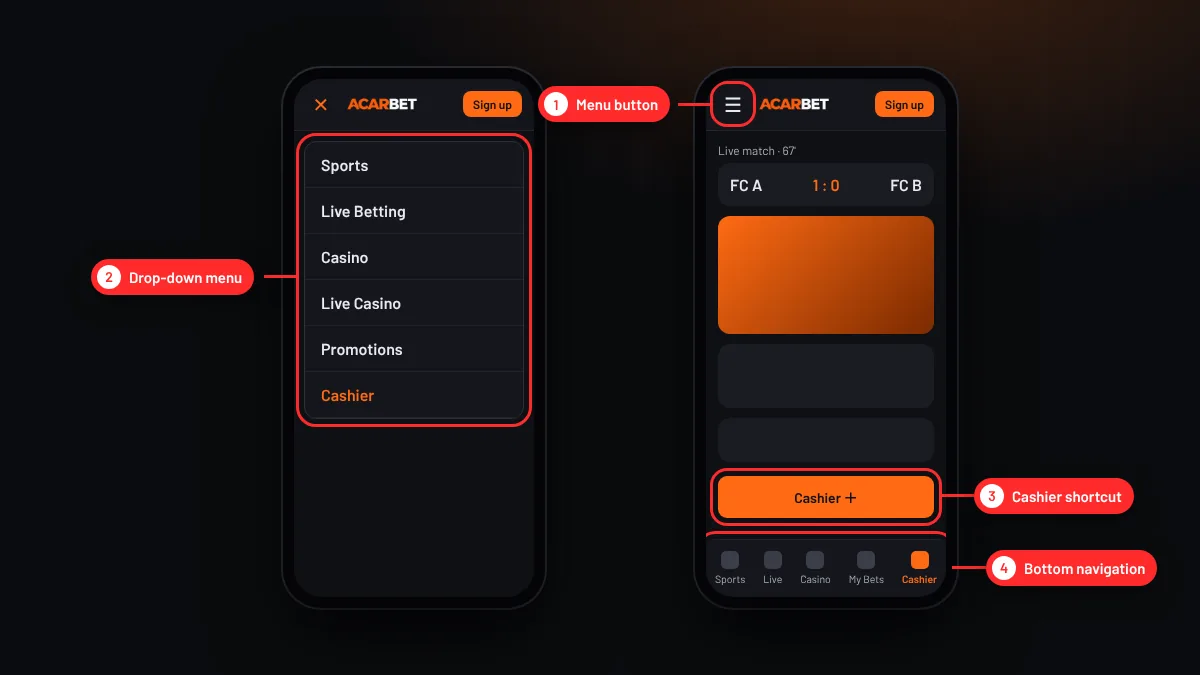
The casino section offers a search box, a provider filter and category tabs (slots, crash, live casino, table games). Tapping a game opens it full screen, and most slots also run in demo mode on mobile. Live tables can be played in portrait mode, although the layout is more comfortable in landscape. Favourites sync with desktop, so a game you starred on your laptop is waiting on your phone. The cashier shortcut is highlighted inside the menu, which makes topping up quick — arguably too quick, so setting a deposit limit is a sensible companion to any Acarbet casino app.
Mobile Data and Battery Use
Data use depends heavily on which part of the site you use. Browsing odds and building pre-match slips uses little data; the animated pitch tracker on in-play pages uses a moderate amount; match streams and live casino tables use the most.
Ways to keep data use down:
- Use Wi-Fi for streams and live casino, or lower the video quality.
- During in-play betting, close the stream and keep only the stats and tracker.
- Close game tabs left open in the background.
Battery drain is driven mostly by screen brightness and video playback. A phone getting warm during a full match stream is normal; battery-saver mode, on the other hand, can delay notifications. Restricting background data for the Acarbet mobile app in your phone settings also helps.
Mobile Troubleshooting
Most mobile problems come from an address change, an outdated version or the browser cache. Here are the most common situations and their fixes:
| Problem | Likely cause | Fix |
|---|---|---|
| APK will not install | Unknown-sources permission off | Grant temporary permission to the browser, then remove it |
| “Parse error” | Incomplete download or old Android version | Download the file again from the site menu |
| App will not open | Old address blocked | Install the current version or open the new address in a browser |
| Shortcut opens a blank page | PWA points to the old address | Delete the icon and add it again from the new address |
| App crashes | Cache or low memory | Clear the cache and close background apps |
| Stream keeps freezing | Weak connection | Switch to Wi-Fi or lower the video quality |
If a problem persists, send live chat your phone model, operating system version and a screenshot of the error. Before you repeat an Acarbet app download or an Acarbet APK download, uninstall the old version to avoid conflicts, and compare the file name and size with the details shown in the site menu. Never install an Acarbet APK from a link someone sent you privately. If nothing else works, the mobile site in your browser is a reliable fallback that always runs on the current address.
A final note for Acarbet Android users: if your phone runs a heavily customised Android version, the “Install unknown apps” setting may sit under Security instead of Apps. For Acarbet iOS shortcuts, clearing Safari’s website data often fixes a shortcut that keeps loading. And whenever you repeat an Acarbet download, treat it like the first one — official menu only.
FAQ
Is there a Acarbet app?
Android users can download an APK file from the site’s own menu; there is no verified version on Google Play or the App Store. On both Android and iPhone, the browser’s “Add to Home Screen” option creates a shortcut that opens the site full screen, feels like an app and uses the same account and balance.
Where can I download the Acarbet APK?
Download the APK only from the “Mobile App” section of the site’s menu, after confirming the current address through official channels. Files shared on forums, in chat groups or on file-sharing sites may have been modified. After installing, switch off the permission that allows installs from unknown sources.
How do I use Acarbet on iPhone?
Open the current address in Safari, tap the “Share” icon and choose “Add to Home Screen”. The new icon opens the site full screen and updates arrive automatically. You do not need to install any file or configuration profile; links asking you to install a profile are not official and should be ignored.
Are all games available on mobile?
Sports betting, in-play markets, streams, slots and most live casino tables all work on mobile. A few very old games may not be mobile-compatible and are usually hidden from the mobile lobby. Streams and live tables need a stronger connection; on a weak signal the video quality drops automatically to keep playing.
For most players, the mobile site is enough to bet on Acarbet from a phone, and a home-screen shortcut adds an app-like feel without installing anything. The APK is a reasonable choice for Android users who want notifications and a separate icon, provided it comes only from the site’s own menu and the install permission is switched off afterwards. The main drawback is that shortcuts and older versions need updating when the address changes. Because betting on a phone can be fast and impulsive, set a deposit limit before you start. Gambling is for adults aged 18+; if it feels hard to control, visit our safer gambling page or call 0808 8020 133.
The details on this page were reviewed on 11 November 2026. Promotions, limits and the access address can change; the figures shown inside your account are the ones that count.